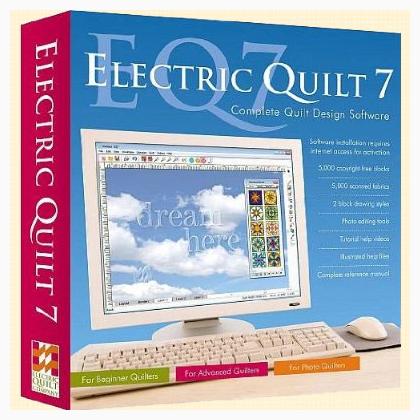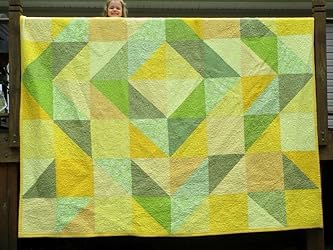
Have you ever thought about effortlessly crafting your own unique quilt designs? Well, let me introduce you to Electric Quilt 7 (EQ7)! Say goodbye to old-school hand-drawn patterns. With EQ7, designing becomes a delightful digital journey right on your computer. And the cherry on top? It figures out the fabric yardage for you.

However, it’s essential to point out that EQ7 has been updated. The newest kid on the block is Electric Quilt 8 which is equally (if not more) fabulous.
Every software has its quirks and learning steps, and EQ7 is no exception. But fret not! Let’s dive into the details and find out if this quilting software resonates with your quilting aspirations.
Unboxing Electric Quilt 7: Features Galore!
- Photo Layout Playground
- Image Workstation
- In-depth Reference Manual
- 25 vibrant tutorials complemented by 10 instructional videos ️
- Requirements: Windows 7, Windows Vista, or Windows XP plus an internet connection ️
- Magical transformation of regular images into quilt masterpieces ✨
- Massive library with fabrics, blocks, and layouts
- Inclusive sketchbook for image edits
Let’s Dive Deeper into EQ7!
Having graced the quilting community for a while, the Electric Quilt series, particularly its seventh iteration, has evolved impressively. This gem not only simplifies quilt designing but also boasts a rich set of tutorials and lessons to amplify its potential.
Some standout EQ7 features that had me swooning include:
- Effortless Creation & Design: EQ7’s treasure trove of 10 videos and 22 PDF lessons break down every feature, ensuring you master the art of quilt designing. Think of it as having a mentor beside you every step of the way!
- Unlimited Activations: Whether you’ve one computer or several, EQ7’s got your back. Transfer designs seamlessly, ensuring you’re always close to your patterns.
- Coloring Blocks & Quilts: An expansive library featuring over 5,000 scanned fabrics awaits. Plus, you can add your fabrics and edit them within the software. The auto-scaling feature ensures your designs translate perfectly to the real world!
- Versatile Designing: From novice to expert, EQ7 caters to all. Explore pre-designed layouts or let your imagination run wild and craft your own.
- Free Block Patterns: A whopping 5,000 copyright-free blocks to tweak, reuse, and get inspired. Plus, the Serendipity tool adds an exciting twist, letting you spawn new block designs.
- Boundless Creativity: Design borders, use images, and so much more! The software makes quilt design a holistic experience. Plus, EQ7 introduces an image import feature, letting you play with fabrics even before you stitch.
- Effortless Printing: Print patterns with a snap of a finger! No more headaches with math; EQ7 has got all those calculations sorted out for you. ️
- Professional Outputs: Perfect for teachers, guild members, or website owners. Showcase your designs with finesse, be it in books, websites, or newsletters.
What’s Hot and What’s Not ❄️
Pros:
- Intuitive quilt design process ✏️
- Bountiful tutorials and instructional videos
- Multipurpose – Use it on various computers ️
- Uploading and designing made easy
- Accuracy without the math headaches
- Print patterns seamlessly ️
- A treasure trove of fabrics and block patterns
Cons:
- Initial learning curve (But hey, every masterpiece starts with a single stitch!)
Remember, every software, including EQ7, comes with its set of learnings. But with the resources EQ7 provides, you’ll be designing like a pro in no time! So, unleash your inner quilt artist and let EQ7 bring your visions to life.
| Details | Specification |
|---|---|
| Software Name | Electric Quilt 7 (EQ7) |
| Latest Version | Electric Quilt 8 |
| Unique Feature | Automatic Fabric Yardage Calculation |
| Learning Resources | 10 Videos + 22 PDF Lessons |
| Fabric Library | Over 5,000 Scanned Fabrics |
| Design Library | 5,000 Copyright-free Blocks |